Skip to content

Blog

Talisman 26.16.0

Talisman 26.16.0 brings Studio for VS Code, Talisman AI that works on your integration projects, and MCP servers built as integrations. It also makes test and production environments lighter to run. Integrations run on Apache Camel 4.22 and Java 25.

Studio for VS Code (preview)

The Talisman designers now run inside Visual Studio Code. You design, run and ship integrations from your own git repository and your own CI/CD.

  • Visual designers: the Topology Designer, the Route Designer for routes and Kamelets (the full Apache Camel 4.22 catalog), OpenAPI, JSON Schema and PLC (Siemens S7). Everything is saved as plain YAML or JSON, so you can edit in the designer or the text editor, side by side.
  • Run and observe locally: run a project on Docker or a local Kubernetes cluster and see changes without a restart. A live runtime panel shows routes, statistics, errors with the failed message, traces and JVM health. Try out APIs and MCP servers against the running project, and start ready-made dev services such as Kafka, PostgreSQL and ActiveMQ Artemis.
  • Build and deliver: build a container image and push it to your registry, or add a CI/CD pipeline for GitHub Actions or Azure Pipelines in a few clicks. You can also promote a build between environments and export a project as a zip archive.
  • Smart editing: completion, validation and one-click fixes for Apache Camel configuration and Groovy scripts, including renamed and removed options.
  • Try it free: a 30-day trial on first use, with no sign-up. The license file is checked on your machine, and Studio sends no telemetry.

Install it from the VS Code Marketplace (talisman-platform.talisman-studio). See Studio for VS Code and the Development & Deployment Principles for the two ways to use it: VS Code with Server Build and VS Code with CI/CD.

Talisman AI

Talisman AI works in both Studio Web and Studio for VS Code, with your own Anthropic, Google Gemini or OpenAI key.

  • A coding agent that plans, writes, validates and runs a change in your project.
  • Task templates for common work: new routes, Groovy scripts, SQL, Apache Camel upgrades and more.
  • Watch the AI's work live in the project topology. It asks questions or shows a form when it needs input.
  • Protect each project with its own AI password, and block components the AI may not use.
  • Sensitive values are masked in AI session records.

MCP servers as integrations

Build Model Context Protocol (MCP) servers the same way as any other integration: Apache Camel routes implement the tools, resources and prompts.

  • An MCP designer to declare tools, resources and prompts, with OAuth support.
  • MCP TryOut in Studio Web and Studio for VS Code.
  • MCP servers and AI agents appear in the Development Dashboard and the project topology.

Lean servers for test and production

Test and production instances of Talisman Server can run without git, and with OpenID Connect also without a database. They show the running integrations read-only and keep full monitoring, health checks and self-healing.

Talisman Server and Studio Web

  • Deploying to Kubernetes: per-environment overrides are merged into the deployment, redeploying a running integration does a rolling update, and the confirmation shows exactly what will be applied.
  • Promotion: build once and promote the same image and manifest from development to test to production.
  • Image signing: optionally sign container images with Cosign.
  • Better visibility: pod events, containers and images per project, errors from running integrations, and an interactive Apache Camel developer console (including SQL).
  • Monitoring for older integrations: integrations still on Apache Camel 4.18 are monitored and healed too.
  • Docker: set resource limits and reservations for containers. Images are built for the host's architecture (amd64 or arm64).
  • Version control: revert a project to any earlier commit.
  • Topology: project size and route count, and a Kamelets list.
  • Refreshed look: new monochrome Apache Camel component icons.

Developer tooling

  • Project validation: checks routes (including component options), Groovy, SQL, OpenAPI contracts and references between files before you run or build.
  • Apache Camel upgrade assistant: moves projects from Apache Camel 4.10, 4.14 or 4.18 to 4.22 (and Java 21 to Java 25) in one step. It reports what changes, applies the safe fixes automatically, and Talisman AI handles the rest.
  • CI builder image: talisman-builder builds and deploys Talisman projects in your own CI with the same tooling Talisman uses. See CI/CD Build.
  • Faster startup for the developer-mode and build images.

Platform

  • Versions: Apache Camel 4.22.2 on Apache Camel Main, and Java 25 for both Talisman and your integrations.
  • Naming: the product names are now Talisman Server (with Studio Web) and Studio for VS Code; together, Studio Web and Studio for VS Code are Talisman Studio.

Upgrading to 26.16.0

  • Apache Camel projects: projects on Apache Camel 4.10, 4.14 or 4.18 should run the upgrade assistant (check, then apply), then validate and test before deploying on 26.16.0.
  • Docker Swarm: support is discontinued. Run integrations on Docker or Kubernetes.
  • Ingress: integration projects no longer create a Kubernetes Ingress. Expose external endpoints through your API gateway or ingress controller.

Happy Integrating!

Talisman 26.15

In addition to upgrading to Apache Camel 4.18.4 LTS, this release introduces the following new features and enhancements:

Topology & Visibility

  • Variable Usage Tracking: Added a Variable List to the project topology, mapping exactly where variables are used across all routes.
  • Bean Usage Tracking: Added a Bean List to the project topology, providing visibility into bean route usage.

Security & Risk Management

image

  • Dependency Vulnerability Reporting: Added comprehensive vulnerability reports that scan and detail risks for all Java integration dependencies.
  • Advanced Risk Metrics: Vulnerability reports now feature Exploit Prediction Scoring System (EPSS) metrics and Grype-based risk assessments for better threat prioritization.

Monitoring & Observability

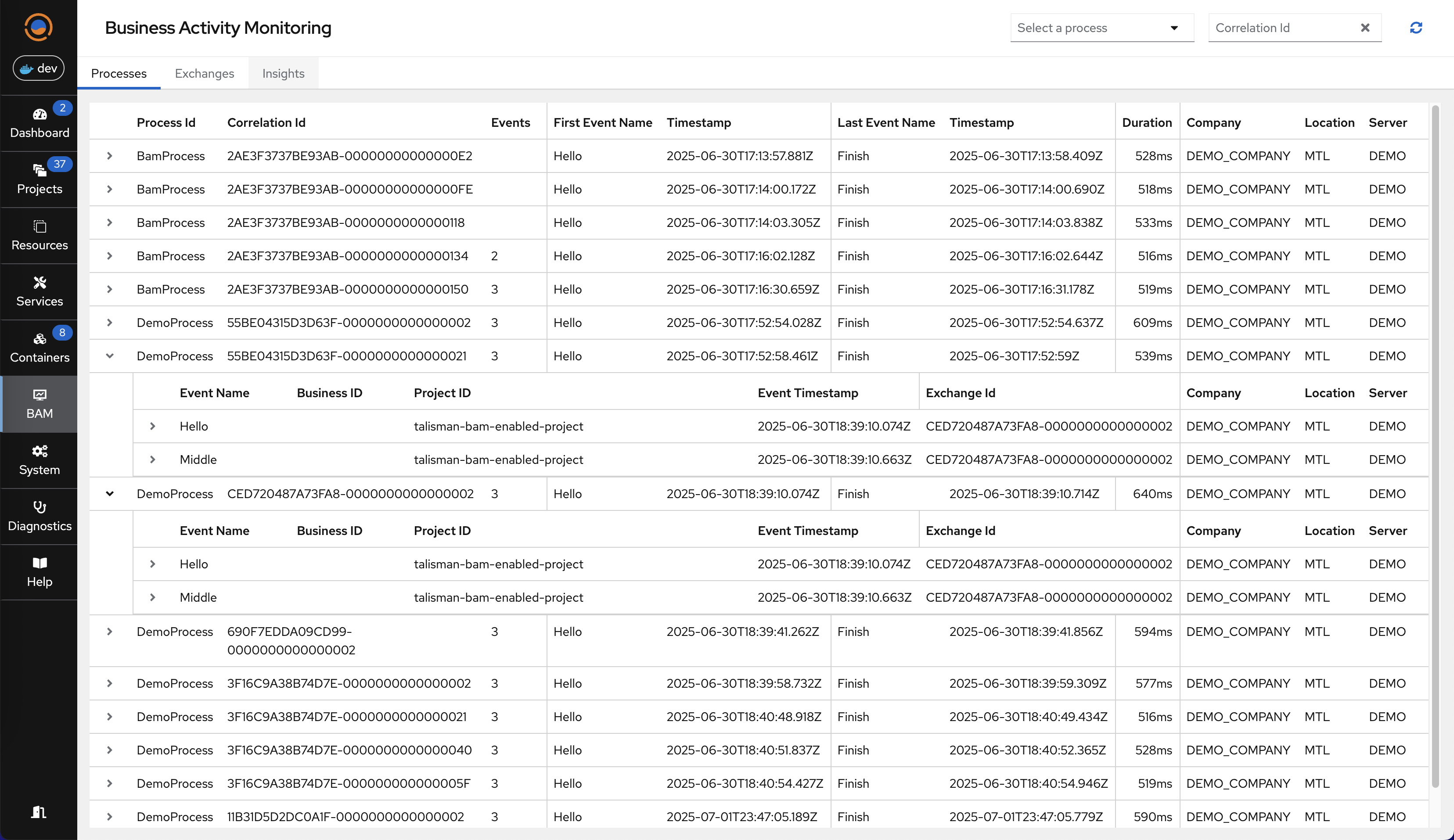
  • Business Activity Monitoring (BAM): Introduced BAM capabilities allowing you to track, monitor, and correlate business events seamlessly across multiple routes and integrations.

Happy Integrating!

Talisman 26.14

In addition to upgrading to Apache Camel 4.18.3 LTS, this release introduces the following new features and enhancements:

Integration Development

image

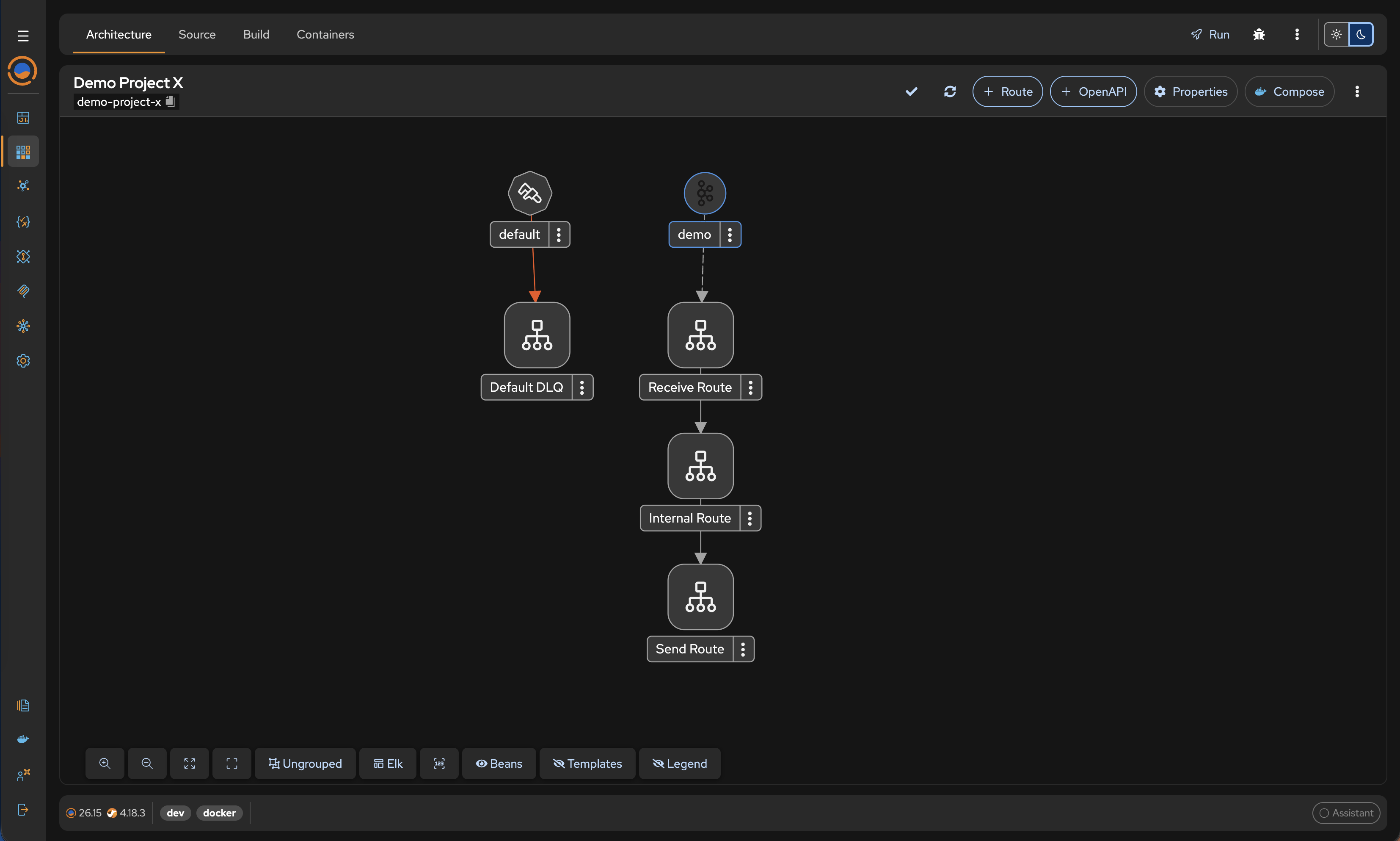
  • 3-Tier Micro-Routing Topology is now configured as the default architecture for all newly created projects
  • Automatically provisions a Default Error Handler for all new projects, streamlining development and immediately improving resilience

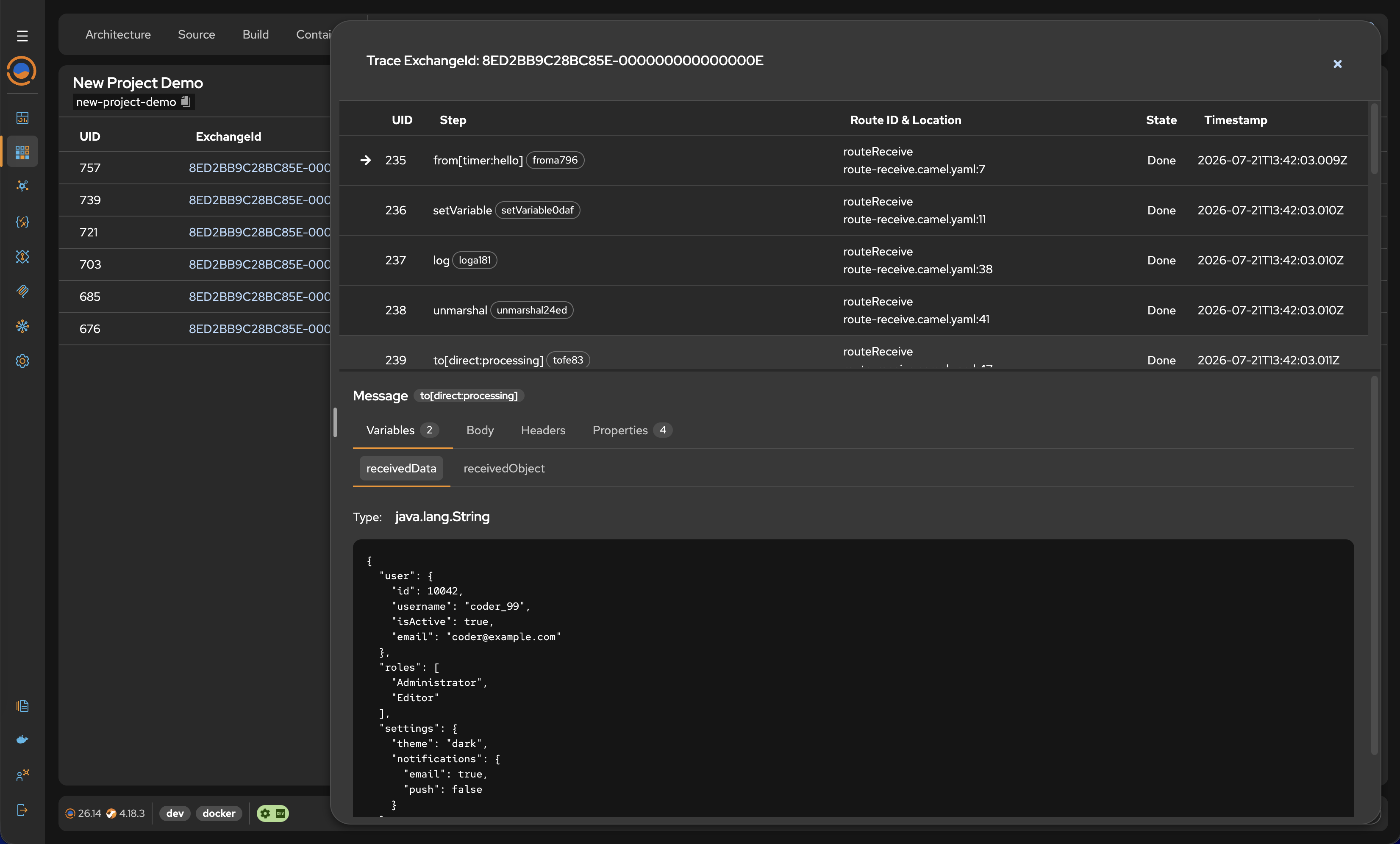
image

  • Trace Tab Restored: Brought back the Trace tab for monitoring and tracing Exchanges in Runtime directly within the UI

Enhanced Security & Infrastructure

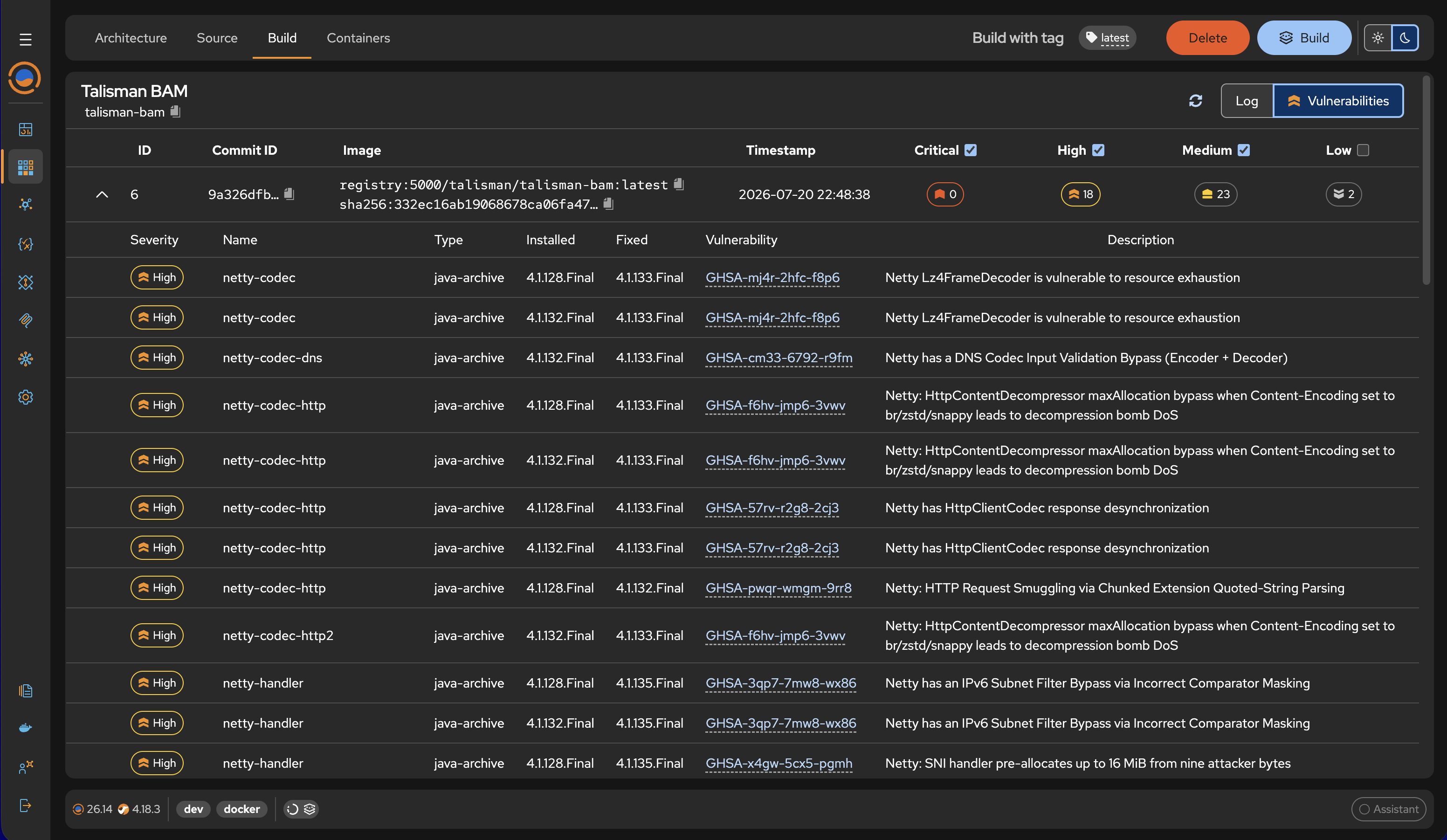
image

  • Automated Vulnerability Scanning: The integration build process now automatically packages scan result images and provides detailed vulnerability reports
  • Hardened Container Images: The Talisman Platform container image is now built on Red Hat Universal Base Image (UBI) and Red Hat Hardened Images to meet strict enterprise security standards

User Interface Enhancements

  • Officially completed the migration to the sleek, modern Compass UI for a unified user experience
  • Introduced a powerful new Command Palette, replacing the legacy Component Selector to offer a faster, more intuitive workflow
  • In the Command Palette, developers can now define the initial consumer right from the start during project creation
  • Added built-in visual preview support for Markdown files
  • Added Camel Context HTTP Endpoints directly in the Runtime Tab
  • Fix: Resolved read-only enforcement issues in Production Mode
  • Fix: Configuration PUT method in the RST DSL Designer
  • Fix: Addressed stability issues within the OpenAPI Designer

Happy Integrating!

Talisman 26.09

This release expands our comprehensive integration ecosystem, bringing powerful new visual tools for Model Context Protocol (MCP) servers, streamlined route management, and high-level multi-project topology visualization to give you unprecedented oversight of your entire integration landscape.

MCP Designer

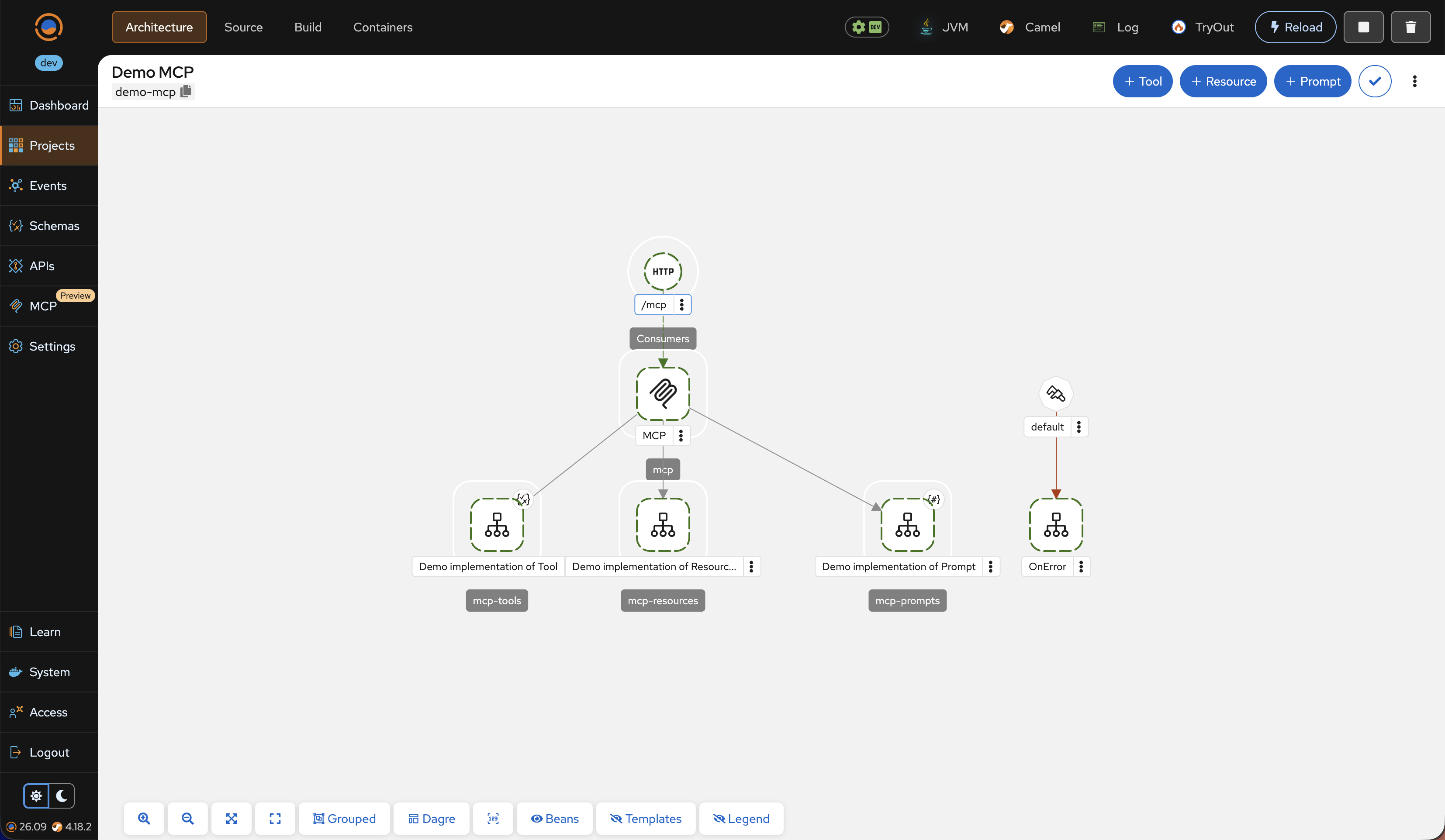
image

  • Introduces the new visual MCP Designer, rounding out the suite alongside the existing MCP Registry and MCP Browser
  • Utilizes the same intuitive visual paradigm as the Apache Camel Architecture topology and route designers
  • Empowers developers to visually create and manage Model Context Protocol (MCP) servers using familiar tools and workflows

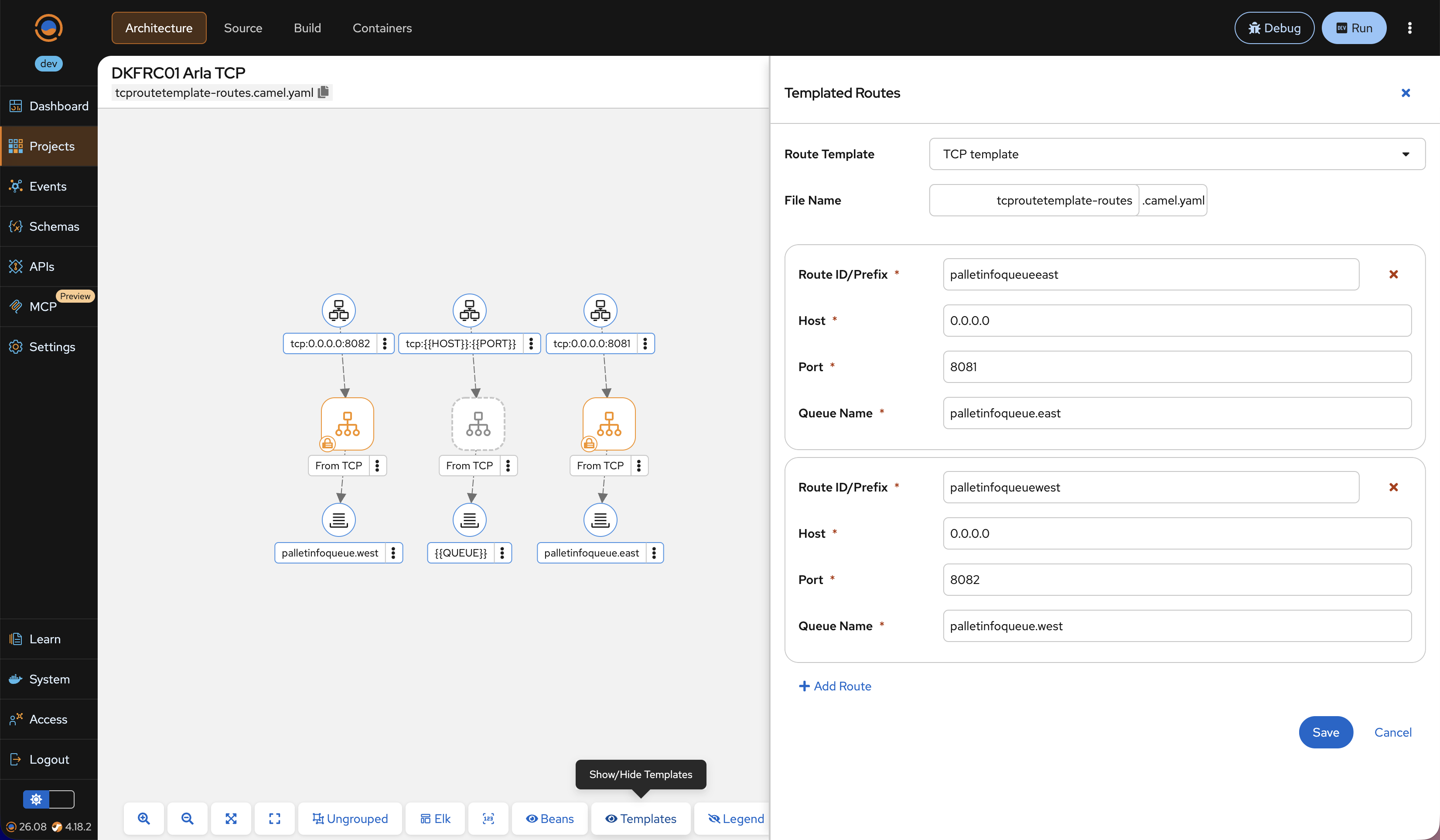
Templated Route Panel

image

  • Dedicated new panel for simplified route management
  • Quickly and easily instantiate and configure Templated Routes from your existing Route Templates

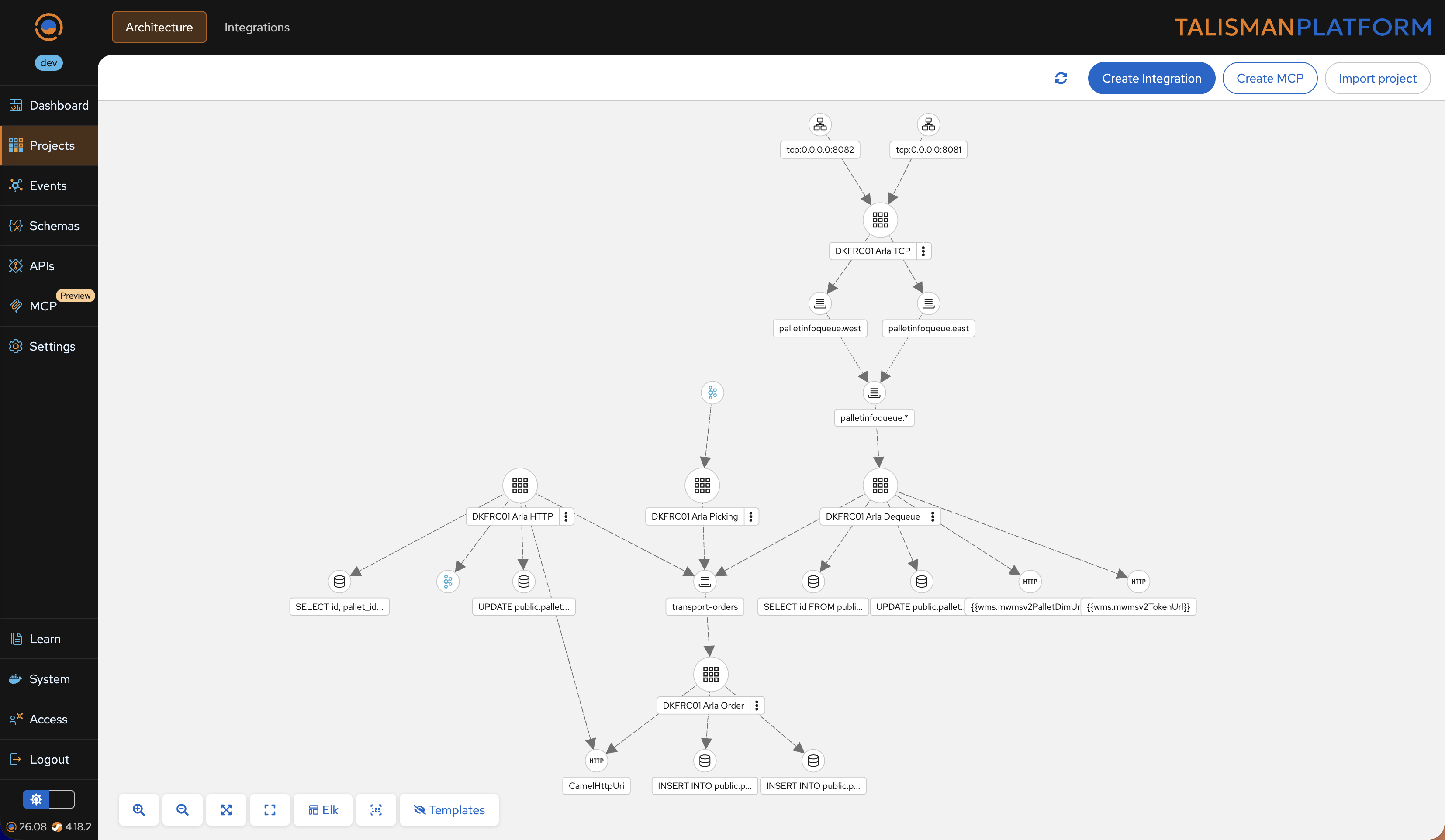
Projects Architecture Topology

image

  • End-to-end visualization across all integration levels: seamlessly drill down from the macro-level Projects Architecture, to single Project Architecture, right down to the Route Designer
  • Provides a clear, auto-generated map of all integration projects, their interconnections, and links to external systems
  • Built-in macro observability featuring top-level exchange processing statistics across your entire landscape

Happy Integrating!

Talisman 26.01

The long-awaited Talisman 26.01 is now available.

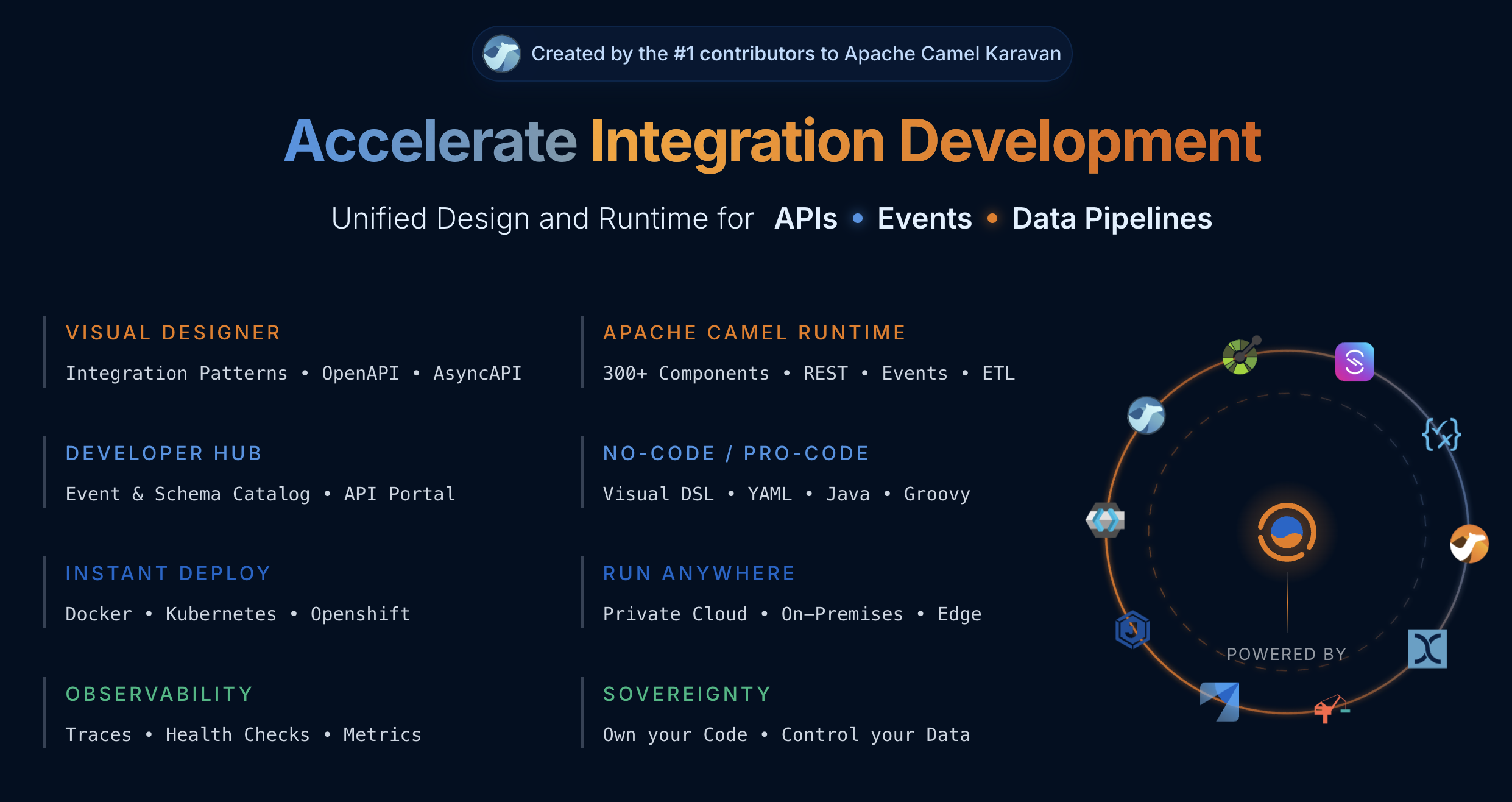
This release enhances the platform’s Unified Design approach, allowing teams to design Camel Routes, OpenAPI, AsyncAPI, and JSON Schema in one environment while running APIs, events, and data pipelines on the latest Apache Camel 4.18.x LTS runtime — with full ownership of your code and control over your data.

image

Highlights

Landscape Designer & Route Generator (AsyncAPI)

  • Visual topology designer for complex message flows
  • AsyncAPI contracts automatically kept in sync
  • Automatic generation of production-ready Apache Camel routes
  • Built-in observability with message throughput on the topology graph

JSON Schema Designer & Manager

  • Visual schema modeling without manual JSON editing
  • Impact analysis for OpenAPI and AsyncAPI dependencies
  • One-click generation of JSON examples and Groovy POJOs

OpenAPI Suite (Designer & Portal)

  • Visual OpenAPI contract design with automatic Camel route generation
  • Interactive developer portal with built-in endpoint testing
  • Unified microservice catalog with real-time traffic and health metrics

Happy Integrating!

Talisman BAM

Introducing Business Activity Monitoring, the latest Operations Accelerator on the Talisman Platform!

Key Features:

  • Collect Apache Camel Routes and Processors execution metrics
  • Collect user-defined business events
  • Aggregate data across multiple servers, projects, and routes
  • Use custom correlation IDs to trace business data across complex, distributed integrations

bam.png

🔮 Effortless insight. Total traceability. Only with Talisman.

OpenAPI Designer

Introducing the OpenAPI Designer, a new Development Accelerator coming to the Talisman Platform!

Key Features:

  • Visual design for OpenAPI 3.1
  • Auto-generate Path Operations, Responses, and corresponding Apache Camel Routes
  • Smooth navigation between OpenAPI Designer and Route Designer
  • API TryOut for fast implementation testing

🔮 Stay tuned for more updates!

Talisman Platform 4.8 Part 5

Introducing the Visual Routes Debugger on the Talisman Platform!

We’re pushing the boundaries of what’s possible in integration development, and this new development accelerator is a game-changer.

Key Features:

  • Step-by-step route debugging
  • Automatically switching between routes
  • Data exchange insights – body, variables, headers, and properties
  • Exchange data for every executed step
  • Visibility into exceptions

With innovations like this, Talisman proves it is the leading Integration Development Platform for Apache Camel.

🔮 Stay tuned!

Talisman Platform 4.8 Part 4

I am absolutely thrilled to announce a new feature of the Talisman Platform: the Expression Sandbox!

The Expression Sandbox empowers developers to build data transformation code using Apache Groovy in just seconds. It’s a dream come true for anyone looking to simplify and supercharge their data workflows.

What makes it incredible: - Leverages powerful programming language that’s easy to learn for developers from any background. - Provides interactive code evaluation. - Supports multiple built-in data format converters.

Whether you’re a seasoned Apache Camel expert or new to the world of data transformation, the Expression Sandbox is here to turn you into a data transformation overachiever!

🔮 Stay tuned!

Talisman Platform 4.8 Part 3

Talisman Platform 4.8 supports the provisioning of preconfigured services for development

Commonly used services such as messaging, email, and databases are available out of the box. Additionally, users can configure their own development services.

  • Preconfigured services for development
  • User-defined services
  • Supported on both Docker and Kubernetes

🔮 Stay tuned for more updates!